
How to Proctor Google Forms Tests: Limitations & Better Options
Google Forms is easy to use but has critical limitations for online exams — no timer, no proctoring, no cheat detection. This guide covers all constraints and shows how MonitorExam overcomes them for secure, reliable online testing.
⚡ Quick Answer
Google Forms is great for simple quizzes and surveys — but it has no built-in timer, proctoring, or cheat detection. For secure online exams, pairing it with a proctoring tool like MonitorExam is essential.
Google Forms is the first tool most teachers think of when setting up an online test. It's free, easy to use, and requires no technical knowledge. But when it comes to secure, proctored exams, Google Forms falls short in several critical ways.
This guide covers exactly what Google Forms can and cannot do, how to work around its limitations, and when to switch to a dedicated proctoring platform.
Can Google Forms Turn On Your Camera?
No — Google Forms cannot turn on your camera. There is zero chance of a webcam activating during a Google Forms exam unless your institution has added a third-party proctoring tool.
Google Forms is a form builder. It records:
- What answers you submit
- Your email address (if required)
- Your submission timestamp
It does not and cannot access:
- Your camera or webcam
- Your microphone
- Your screen
- Your other browser tabs
Camera monitoring during a Google Forms exam only happens when a proctoring tool like MonitorExam is used alongside Google Forms.
What Google Forms Can Do
Google Forms supports a wide range of question types and is genuinely useful for low-stakes evaluations:
- Multiple question formats — MCQs, short answer, paragraph, checkboxes, dropdowns, file upload, and linear scale.
- Image & media support — Add images to questions; students can upload photos of handwritten answers.
- Easy sharing via link — Distribute tests instantly — no student accounts required.
- Auto-grading for MCQs — Set correct answers and Google Forms scores submissions automatically.
- Google Sheets integration — All responses flow directly into a spreadsheet for analysis.
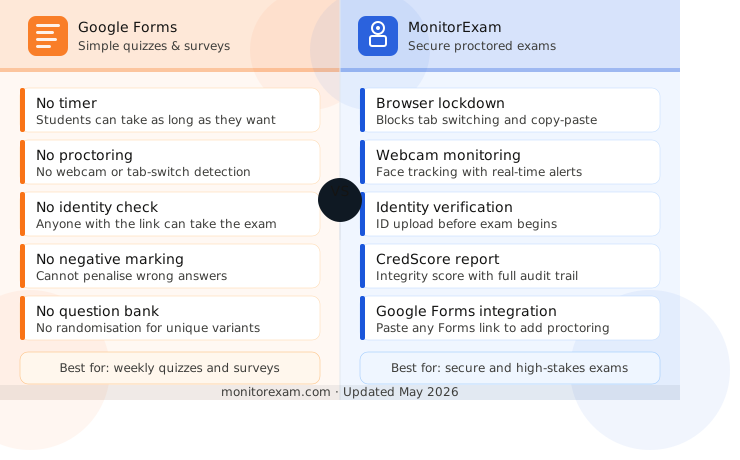
6 Critical Limitations of Google Forms for Exams
These gaps make Google Forms unsuitable as a standalone tool for high-stakes or proctored exams:
| ❌ Limitation | Why It Matters |
|---|---|
| ⏱ No Timer | Students can take as long as they want unless you use a third-party add-on |
| 👁 No Proctoring | No webcam monitoring, tab-switch detection, or real-time alerts |
| ➖ No Negative Marking | Cannot penalise wrong answers — critical for competitive exams |
| 🔒 No Privacy Control | Anyone with the link can take the exam — no identity verification |
| 📝 No Explanation Space | Answers are right or wrong only — no partial credit or justification |
| 📋 No Question Bank | No randomisation engine for creating unique exam variants |
Workarounds to Reduce Cheating in Google Forms
These built-in options can reduce (but not eliminate) cheating risk:
- Shuffle answer choices — Randomises MCQ option order so students can't share answers by letter.
- Add section page breaks — Prevents students from going back to review and change previous answers.
- Enable locked mode (Chromebook only) — Restricts students to a single browser tab — only works on managed Chromebooks.
- Vary questions per student — Create multiple form versions with different question sets to prevent sharing.
- Enable password protection — Add a required answer field at the start for a shared exam password.
⚠️ Note: These workarounds significantly reduce cheating but cannot fully prevent it. For high-stakes exams, a dedicated proctoring solution is essential.
Google Forms vs MonitorExam: Feature Comparison
| Feature | Google Forms | MonitorExam |
|---|---|---|
| Timer / Time limits | ✗ No | ✓ Yes |
| Tab switch detection | ✗ No | ✓ Yes |
| Webcam proctoring | ✗ No | ✓ Yes |
| Identity verification | ✗ No | ✓ Yes |
| Negative marking | ✗ No | ✓ Yes |
| Cheat alerts (real-time) | ✗ No | ✓ Yes |
| Access control | ~ Limited | ✓ Full |
| Auto-grading | ✓ Yes (MCQ) | ✓ Yes |
| Google Forms integration | ✓ Native | ✓ Yes |
| Free to use | ✓ Free | ~ Free tier |
| Best for | Quizzes & surveys | Secure exams |
How MonitorExam Fills the Gaps
MonitorExam is built specifically for online exam security. It works alongside Google Forms — you simply paste your Google Forms link into MonitorExam to add a full proctoring layer.
- 🔒 Browser Lockdown — Prevents tab switching, copy-paste, and screen sharing during the exam.
- 📷 Webcam Monitoring — Tracks face presence, multiple people, and suspicious movements in real time.
- 🆔 Identity Verification — Verifies student identity via ID upload before the exam begins.
- ⚠️ Real-Time Alerts — Instantly notifies teachers when suspicious behaviour is detected.
- 📊 CredScore Report — Generates an integrity score for every student with a full audit trail.
- 💬 Live Teacher Chat — Teachers can communicate with students mid-exam to resolve issues.
Which Tool Should You Use?
| Use Case | Recommended Tool |
|---|---|
| Weekly quiz or homework check | Google Forms alone |
| Class test with basic security | Google Forms + shuffle + sections |
| Mock exam with light monitoring | Google Forms + MonitorExam (light) |
| Internal company assessment | MonitorExam + AI proctoring |
| High-stakes certification exam | MonitorExam with full proctoring |
Need Auto-Grading & Reports? Meet AssessME
For institutions that need more than just proctoring, AssessME is MonitorExam's in-house assessment solution. It plugs directly into your existing Google Forms or MonitorExam setup and adds a full evaluation layer on top.
- ✅ Auto-Submission — Exams are automatically submitted when the timer ends — no manual intervention needed.
- 💾 Auto-Save — Student answers are saved continuously so no work is lost if the connection drops.
- 🎯 Auto-Grading — Instantly grades all question types and calculates scores without manual effort.
- 📈 Report Generation — Generates detailed performance reports per student, class, and question.
💡 How it works together
Google Forms → create your questions | MonitorExam → proctor the session | AssessME → auto-grade and generate reports. Three tools, one seamless workflow.
Frequently Asked Questions
Can Google Forms detect cheating?
No — Google Forms has no built-in cheat detection. It cannot detect tab switching, screen sharing, or multiple users. Pair it with MonitorExam for real-time monitoring.
Does Google Forms have a timer?
Not natively. You can use a third-party add-on or set a manual deadline, but there is no built-in countdown timer for students.
Is MonitorExam free?
MonitorExam offers a free tier for small-scale use. Paid plans unlock advanced proctoring features like AI anomaly detection and detailed audit logs.
Can I use Google Forms for entrance exams?
Not recommended on its own — it lacks negative marking, identity verification, and proctoring. Use MonitorExam alongside Google Forms for entrance-level security.
Ready to Run Secure Online Exams?
Set up a proctored Google Forms exam in under 5 minutes with MonitorExam. Free to try.