
How to Proctor a Google Forms Exam in 5 Minutes (No Extension Needed)
Reddit teachers have tried everything — ExtendedForms, Google Meet, lockdown browsers, and AI proctoring. Here's what actually works for securing Google Forms exams at scale, with honest pros and cons for each method.
Updated July 9, 2026 · 9 min read · MonitorExam
Reddit teachers have tried everything — ExtendedForms, Google Meet, lockdown browsers, and AI proctoring. Here's what actually works for securing Google Forms exams at scale, with honest pros and cons for each method.
In this guide:
- → Can Google Forms detect copy and paste?
- → Can Google Forms detect tab switching?
- → Can Google Forms detect ChatGPT use?
- → The 5 methods that actually work
- → Which method fits your situation
Experience how MonitorExam enables you to proctor a Google forms Exam
15 proctored exams/month permanently. No camera required. No installation. Works with Google Forms, Canvas, Moodle, or any exam URL. CredScore delivered at submission.
Start free → See pricingCan Google Forms Detect Copy and Paste?
No — Google Forms cannot detect copy and paste.
This is the most searched question about Google Forms exam security — and the answer affects every teacher who has run an online exam. When a student copies text from ChatGPT, a website, or their notes and pastes it into a Google Forms answer, Google Forms records only the submitted text. It has no clipboard monitoring, no paste-event detection, and sends no alert to the teacher.
A student who types their own answer and a student who pastes a ChatGPT-generated answer produce identical submissions in Google Forms. There is no way to tell them apart from the response sheet alone.
Can Google Forms see if you copy and paste? No — Google Forms cannot see clipboard activity at any point during an exam session. It records what was submitted, not how the text was entered.
Can Google Forms tell if you copy and paste? No. The form receives text input. It cannot distinguish between text typed character by character and text pasted in a single action.
Does Google Forms know when you copy and paste? No. Google Forms has no awareness of keyboard events, clipboard events, or paste actions. It only records the final submitted response.
Can teachers see copy and paste on Google Forms? Not with Google Forms alone. Teachers using MonitorExam alongside Google Forms can see copy-paste events — MonitorExam blocks paste attempts in real time and logs each one with a timestamp in the CredScore report.
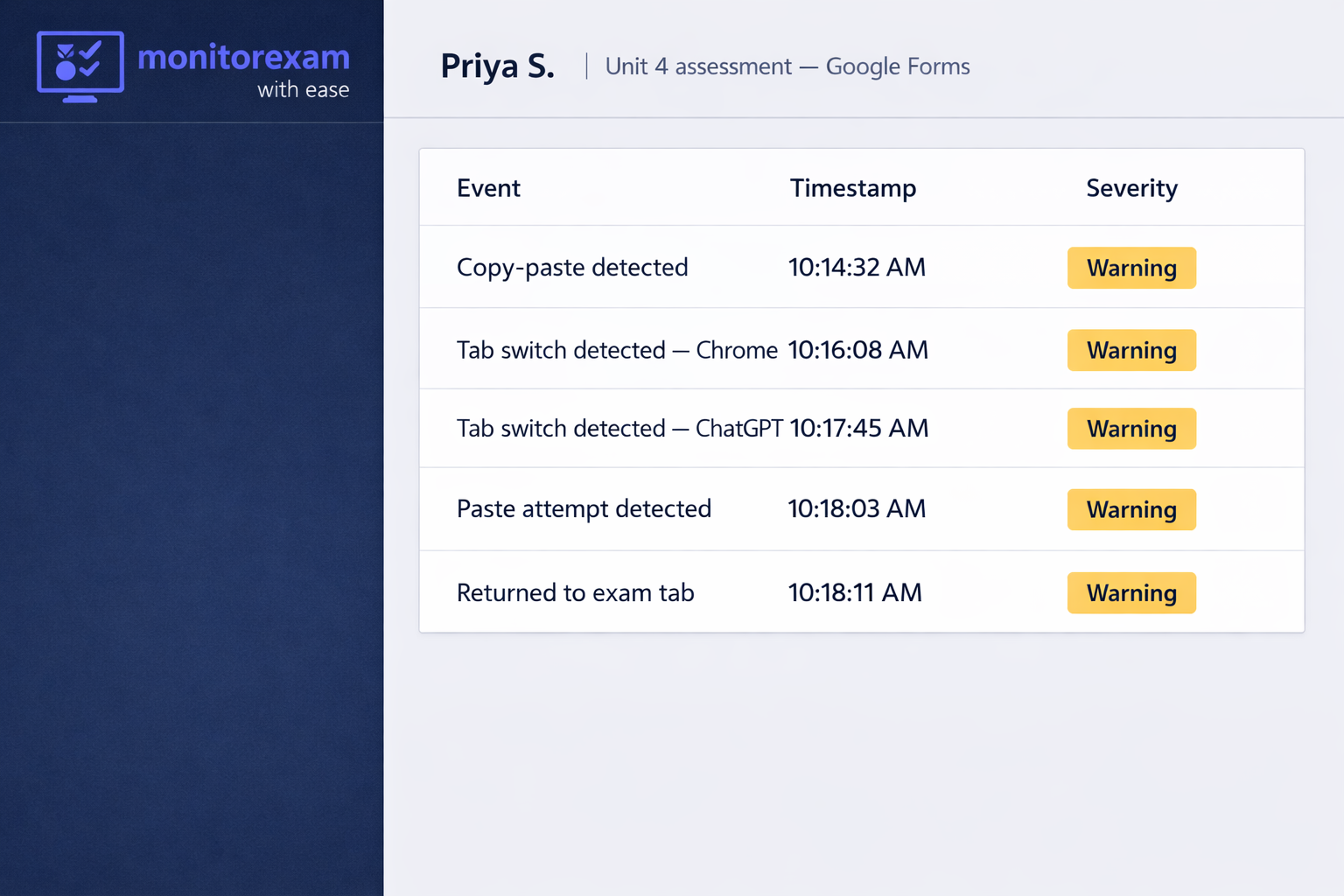
Detect copy-paste on your next Google Forms exam
MonitorExam blocks paste events in real time — and logs every attempt with a timestamp.
Free for 15 exams/month. No installation. Works with any Google Forms link.
Can Google Forms Detect Tab Switching?
No — Google Forms cannot detect tab switching.
When a student opens a new tab to search for answers, check notes, or paste a question into ChatGPT, Google Forms has no record of it. The form simply stays open in the background. This is the second most common form of cheating on Google Forms exams in 2026.
Can Google Forms detect switching tabs? No — on personal devices, tab switching is completely invisible to Google Forms. The only exception is Locked Mode on school-managed Chromebooks with Google Workspace for Education — it prevents switching but only on qualifying school-owned devices.
Can Google Forms detect screenshots? No. Google Forms has no screen monitoring capability and cannot detect when a student takes a screenshot of exam questions.
Can Google Forms detect ChatGPT use? No — and this is the critical gap in 2026. A student can switch to a new tab, paste the exam question into ChatGPT, copy the generated answer, and paste it back into Google Forms. Google Forms records the final answer with no trace of this process. MonitorExam detects both the tab switch to ChatGPT and the subsequent paste event.
Why Proctoring Google Forms Is Harder Than It Looks
Before diving into the methods, it's worth understanding what you're actually trying to prevent:
- Copy-paste — copying questions into AI tools and pasting answers back
- Tab switching — opening Google, ChatGPT, or notes in another tab
- Identity fraud — a different person taking the exam
- Screen sharing — sharing the screen with someone off-camera
- Collaboration — two students working together remotely
Google Forms alone catches none of these. Here's what actually helps.
Method 1 — ExtendedForms Add-on
ExtendedForms is a Google Workspace Marketplace add-on that plugs directly into Google Forms and adds a lightweight proctoring layer.
What it adds:
- Countdown timer with auto-submit when time runs out
- Restricts to one attempt per respondent
- Welcome screen with instructions before the exam begins
- Basic tab switch detection (limited)
- Live response monitoring dashboard
What it doesn't do:
- No copy-paste detection or blocking
- No webcam or face tracking
- No identity verification
- No AI anomaly detection
- No detailed integrity report per student
Best for: Class quizzes, homework checks, low-stakes tests where you just need a timer and one-attempt restriction.
| Ease of setup | Scale | Security level | Cost |
|---|---|---|---|
| ⭐⭐⭐⭐⭐ Very easy | Up to 100 students | Low | Free / $10/mo |
Method 2 — Google Meet + Manual Monitoring
A widely used DIY approach: run the exam in Google Forms while supervising students live on Google Meet.
What it catches:
- Students looking away or leaving the room
- Obvious phone or notes use
- Someone else in the room
What it misses:
- Tab switching (teacher cannot see the browser)
- Copy-paste from ChatGPT or external sources
- Screen sharing or second devices
Best for: Small classes (under 20 students) where the teacher can actively watch each feed.
Reddit verdict: "Works fine for 15 students. Completely unmanageable for 60."
| Ease of setup | Scale | Security level | Cost |
|---|---|---|---|
| ⭐⭐⭐⭐ Easy | Up to 20 students | Medium | Free |
Method 3 — Safe Exam Browser (Lockdown Browser)
Safe Exam Browser (SEB) is a free open-source lockdown browser that restricts students to a single exam window — no tabs, no apps, no copy-paste.
What it does:
- Locks the device to a single browser window
- Disables keyboard shortcuts, right-click, and screen capture
- Prevents switching to other applications
- Works with Google Forms via a direct URL
Limitations:
- Requires installation on every student device — a major barrier
- Does not work on iOS or Chromebooks without workarounds
- No webcam monitoring or identity verification
- Students on personal devices can simply use a different browser
Best for: Computer labs where the school controls device configuration.
Reddit verdict: "Great in theory, nightmare to deploy on personal devices. Half my students couldn't get it running."
| Ease of setup | Scale | Security level | Cost |
|---|---|---|---|
| ⭐⭐ Difficult | Lab environments only | Medium | Free |
Method 4 — Google Workspace Locked Mode (Chromebook Only)
Google Workspace for Education includes a Locked Mode for Google Forms that restricts students to a single tab during the exam.
What it does:
- Prevents tab switching during the exam
- Blocks access to other apps and websites
- Works natively with Google Forms — no add-on needed
Critical limitation: Only works on school-managed Chromebooks. Does not work on personal laptops, phones, tablets, or Windows/Mac devices. No copy-paste detection, no webcam monitoring, no identity verification.
| Ease of setup | Scale | Security level | Cost |
|---|---|---|---|
| ⭐⭐⭐ Medium | Chromebook-only | Medium | Free (Workspace EDU) |
Method 5 — MonitorExam (AI Proctoring)
MonitorExam is a dedicated AI proctoring platform that works alongside Google Forms. Teachers paste their Google Forms link into MonitorExam — students go through a proctored session before accessing the form.
What it detects and blocks on Google Forms:
- Copy-paste — blocked in real time and logged with timestamp ✓
- Tab switching — every switch logged with duration ✓
- ChatGPT use — tab switch + paste event chain detected ✓
- Screen sharing — flagged immediately ✓
- Face absence — logged with timestamp (camera mode) ✓
- Multiple faces — flagged in real time ✓
- Identity fraud — FIDO2 passkey verification before exam ✓
What makes it different: No student installation required. Works on any browser, any device, any bandwidth. Camera-optional mode delivers full proctoring — including copy-paste detection — without a webcam. Free for 15 exams/month permanently.
| Ease of setup | Scale | Security level | Cost |
|---|---|---|---|
| ⭐⭐⭐⭐⭐ Very easy | Unlimited | High | Free tier available |
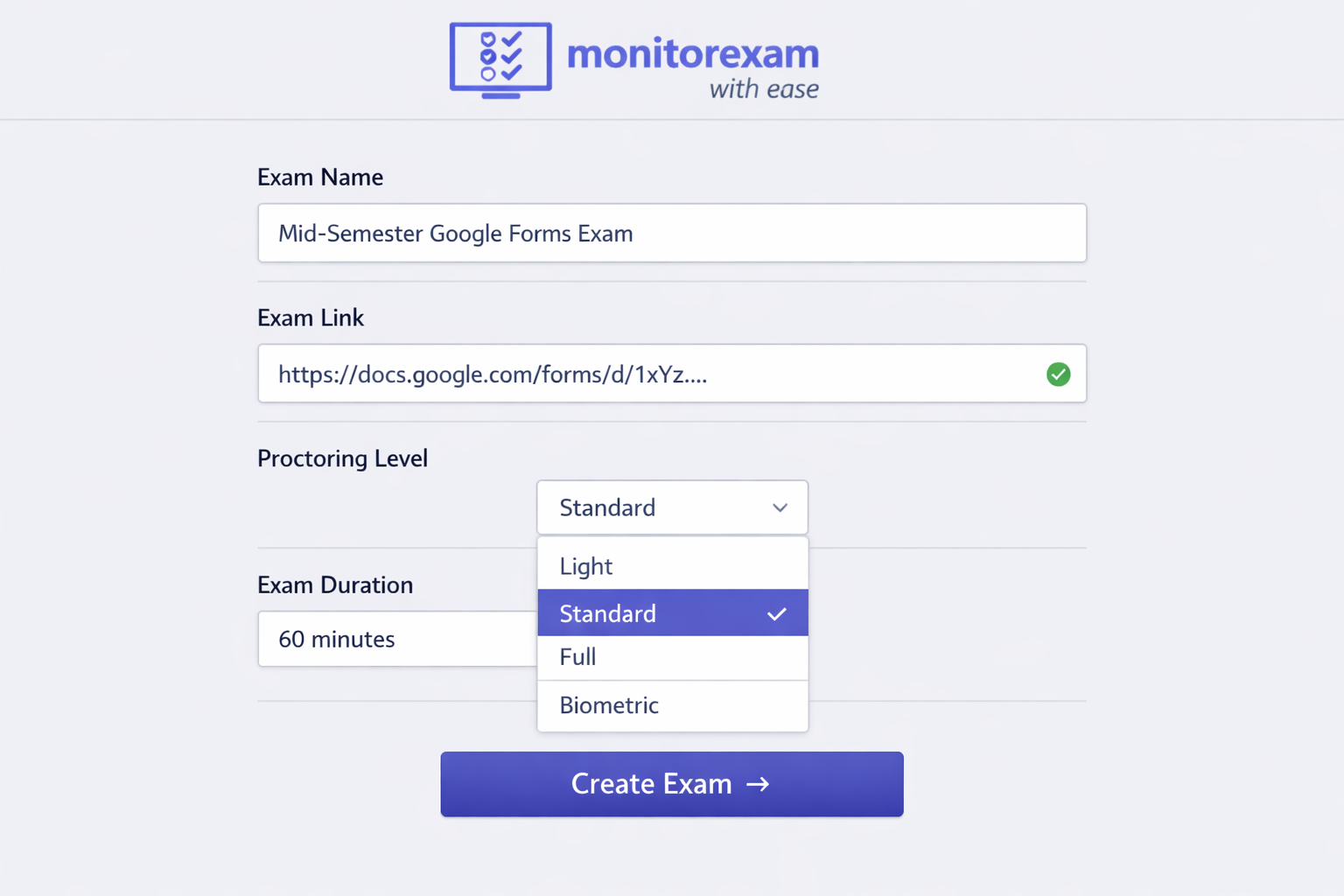
Set it up in 5 minutes
Your Google Forms exam — fully proctored. Tab detection, copy-paste blocking, CredScore.
No installation. No Chrome extension. Camera optional. Free to start.
How to Set Up MonitorExam with Google Forms (5 Steps)
- Go to monitorexam.com and sign in (free — 15 exams/month, no card)
- Click Exam Dashboard → Create Exam
- Paste your Google Forms link in the Exam Link field
- Select proctoring level (Light = browser lockdown + copy-paste detection, no camera required)
- Share the MonitorExam link with students — not the original Google Forms link
Students who open the MonitorExam link go through an identity check, browser lockdown activates, and the Google Forms exam opens inside the proctored environment. Copy-paste is blocked from that moment. Tab switches are logged. CredScore delivered when they submit.
Can Google Forms Detect Cheating — Extended Questions
Can extended forms detect cheating? ExtendedForms adds a timer and one-attempt restriction to Google Forms but does not detect copy-paste, tab switching, or screen sharing. For cheating detection beyond timing control, a dedicated proctoring tool is needed.
Does extended forms can detect cheating? Extended Forms provides basic deterrents (timer, one attempt) but does not have copy-paste detection, AI monitoring, or identity verification. It cannot detect most forms of active cheating.
How can teachers see your screen on Google Forms? Teachers cannot see student screens through Google Forms. If a teacher can see screens, they are using a separate tool — Google Meet screen share, Zoom screen monitoring, or a proctoring tool like MonitorExam that monitors screen activity from the student's side.
How does Canvas track cheating? Canvas itself tracks submission timestamps and can integrate with lockdown browsers and third-party proctoring tools. It does not natively detect tab switching or copy-paste without an integrated proctoring tool. MonitorExam integrates with Canvas via the CredAPI — paste any Canvas quiz link for the same proctoring layer.
Apakah keluar dari Google Form ketahuan? Ya — jika menggunakan MonitorExam, setiap kali siswa meninggalkan tab Google Forms akan tercatat dengan waktu yang tepat. Tanpa alat proctoring, Google Forms tidak dapat mendeteksi ketika siswa berpindah tab atau meninggalkan formulir.
Side-by-Side Comparison
| Feature | ExtendedForms | Google Meet | Safe Exam Browser | Locked Mode | MonitorExam |
|---|---|---|---|---|---|
| Copy-paste detection | ✗ No | ✗ No | ✓ Blocks | ✗ No | ✓ Blocks + logs |
| Tab switch detection | ~ Limited | ✗ No | ✓ Yes | ✓ Yes | ✓ Yes |
| ChatGPT detection | ✗ No | ✗ No | ✗ No | ✗ No | ✓ Yes |
| Webcam monitoring | ✗ No | ~ Manual | ✗ No | ✗ No | ✓ AI-powered |
| Identity verification | ✗ No | ~ Visual | ✗ No | ✗ No | ✓ FIDO2 |
| Works on all devices | ✓ Yes | ✓ Yes | ✗ No | ✗ Chromebook only | ✓ Yes |
| No installation | ✓ Yes | ✓ Yes | ✗ No | ✗ No | ✓ Yes |
| CredScore report | ✗ No | ✗ No | ✗ No | ✗ No | ✓ Yes |
| Scales to 1000+ | ✗ No | ✗ No | ~ Limited | ~ Limited | ✓ Yes |
| Free to start | ✓ Yes | ✓ Yes | ✓ Yes | ✓ Yes | ✓ 15/month |
Which Method Should You Use?
| Your situation | Best method |
|---|---|
| Quick class quiz, 20 students | ExtendedForms |
| Small class, camera supervision | Google Meet + Forms |
| School-managed Chromebook fleet | Google Workspace Locked Mode |
| Computer lab with controlled devices | Safe Exam Browser |
| Need to detect copy-paste and ChatGPT | MonitorExam |
| High-stakes exam, any device, any scale | MonitorExam |
| Maximum security (entrance/certification) | MonitorExam + Google Meet |
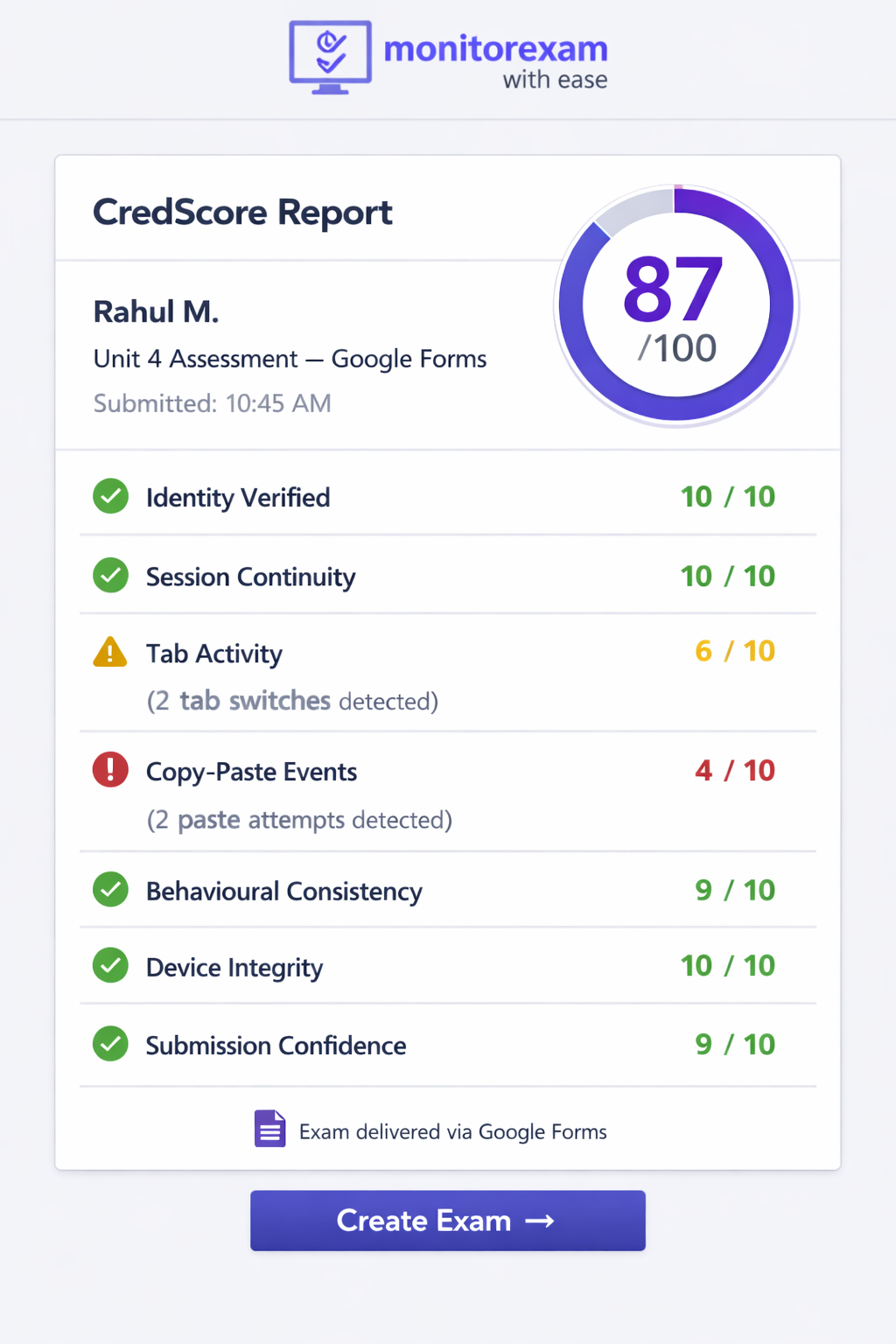
The only method that catches everything
Copy-paste, tab switching, ChatGPT use, screen sharing — all detected. CredScore delivered the moment they submit.
15 exams/month free — permanently. No credit card. Works on any device.
Frequently Asked Questions
Can Google Forms detect copy paste? No — Google Forms cannot detect copy and paste. The form records submitted text only. It cannot determine whether text was typed or pasted. MonitorExam blocks and logs paste events when used alongside Google Forms.
Can Google Forms see if you copy and paste? No. Google Forms has no clipboard access and cannot see paste events at any point during an exam session.
Can Google Forms tell if you copy and paste? No. Google Forms receives the final text entered into each field. It has no visibility into how that text was entered — whether typed, dictated, or pasted.
Does Google Forms know when you copy and paste? No. Google Forms does not track keyboard events, clipboard activity, or paste actions. It records only submitted responses.
Can Google Forms detect tab switching? No — on personal devices, tab switches are invisible to Google Forms. Locked Mode on managed Chromebooks restricts switching but does not alert teachers and requires school-owned devices.
Can Google Forms detect ChatGPT use? No. Google Forms cannot detect whether a student used ChatGPT in another tab. MonitorExam detects the tab switch to the ChatGPT tab and the subsequent paste event — both logged with timestamps.
Can Google Forms detect screenshots? No. Google Forms has no screen monitoring. MonitorExam detects screen-sharing attempts and flags external screen connections.
Can extended forms detect cheating? ExtendedForms adds a timer and one-attempt restriction but does not detect copy-paste, tab switching, or identity fraud. It is a deterrent tool, not a detection tool.
How can teachers see your screen on Google Forms? They cannot through Google Forms alone. Screen visibility requires a separate tool — Google Meet screen share or a proctoring tool like MonitorExam that monitors from the student's device.
Does MonitorExam work with Google Forms? Yes — paste any Google Forms link into MonitorExam. Students open the MonitorExam link instead of the original form URL. Proctoring applies automatically with no installation on any device.
Is there a free tier for proctoring Google Forms? Yes. MonitorExam's free tier covers 15 proctored Google Forms exams per month permanently. No credit card, no expiry.
Can Google Forms detect copy and paste without MonitorExam? No — without a proctoring tool, Google Forms has no copy-paste detection whatsoever. This is true regardless of any settings, add-ons, or configurations applied to the form itself.
Related reading: